
Chat, Cowork or Claude Code: which one to open
Claude now has three ways to work, and each is built for a different job. This guide shows what each one is for, where Cowork actually runs, and a three-question test you can use on any task.
Based on Anthropic's Introduction to Claude Cowork course and Help Center, checked October 2026 and rewritten and illustrated by Fer Patel. Plans, platforms and where tasks run change, so confirm in Claude.
Know the three
See the three side by side
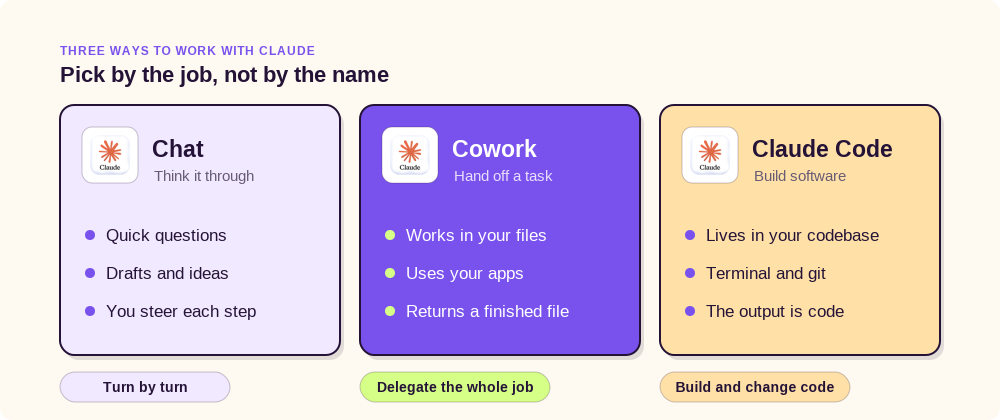
Claude gives you three ways to work, and they are built for different jobs. Chat is a conversation. Cowork takes a whole task off your plate. Claude Code builds software. None of them is better than the others. You pick by the job in front of you.
- Chat: you and Claude go back and forth, one turn at a time.
- Cowork: you describe the result you want, and Claude does the steps and hands back a finished file.
- Claude Code: you work inside a codebase, with a terminal and git.
Heads up: Anthropic is rolling out a version of Claude where Chat and Cowork are one conversation, with no mode to choose. You describe what you want, and Claude decides whether to answer or carry out longer work. The rollout is gradual, so your account may still show separate Chat and Cowork options. The ideas in this guide apply either way.
Know the three
Know what Cowork actually is
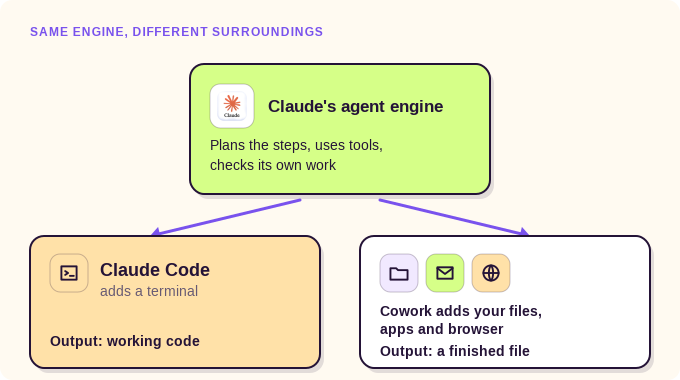
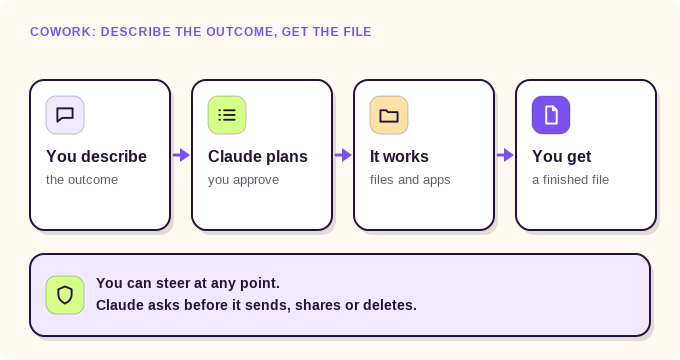
Cowork is a task mode. You describe the result you want at the end, such as a one-page brief or a cleaned-up spreadsheet. Claude plans the steps, works through them and hands back the finished file. It uses the same agent design as Claude Code, but without a terminal. Instead of a codebase, it works with your files, your connected apps and, if you set it up, your browser.
- Same kind of engine as Claude Code: it plans, uses tools and checks its own work.
- Different surroundings: files, apps and a browser instead of a terminal.
- Different output: finished documents, spreadsheets and slide decks, not working code.
Know the three
See where Cowork runs and what it can touch
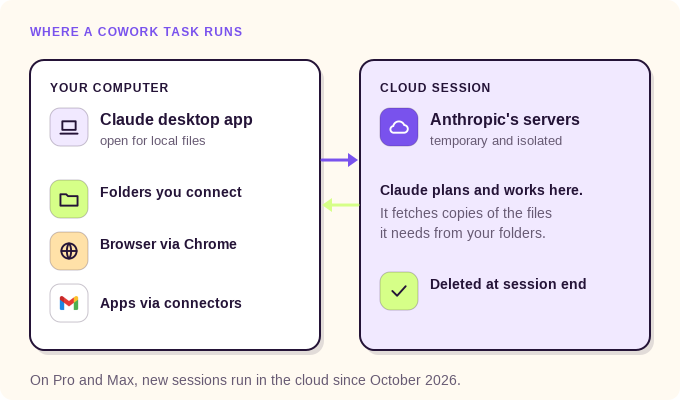
A Cowork task runs in a temporary, isolated session on Anthropic's servers, not on your computer. Your files stay on your computer. Claude reaches them through the Claude desktop app, and only the folders you connect. That is why the desktop app has to stay open when a task needs your local files, your browser or your computer.
- Pro and Max: since October 2026, new Cowork sessions run in the cloud. There is no setting to choose where.
- Your files: the cloud session fetches copies of what it needs from your connected folders. The copies are deleted when you delete the session.
- Your apps and web tools: apps connect through connectors, and sites without one can be reached through Claude in Chrome.
- Team and Enterprise: an admin may need to turn Cowork on for the organization.
Pick one
Use Chat to think
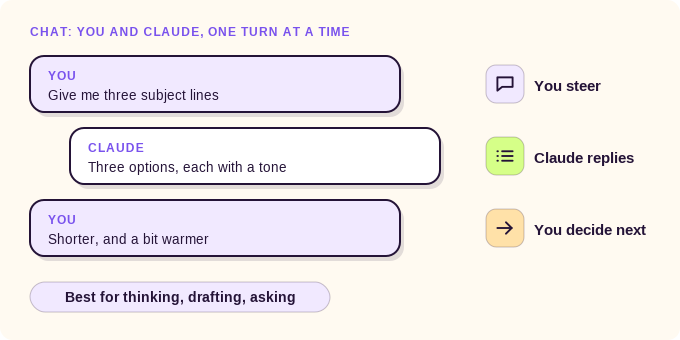
Chat is the right place when you are still working out what you want. You ask, Claude answers, and you decide the next move. You stay in control of every step, which is what you want when the question is still open.
- Brainstorm, outline, or draft and rewrite a message.
- Think through a decision or ask a quick question.
- Paste in some text and ask for a summary.
- Expect to stitch the steps together yourself, one tool at a time.
Pick one
Use Cowork for work you would do yourself
Hand work to Cowork when it has several steps, makes or edits real files, or pulls from more than one app. The test is simple: would you otherwise spend an hour copying between tools? Claude shows its plan first, asks before it sends, shares or deletes anything, and you can steer while it works.
- Turn a folder of notes into a one-page brief (an example).
- Pull this week's updates from your email and chat into one summary (an example).
- Clean up a spreadsheet and build the report from it (an example).
Pick one
Use Claude Code for software
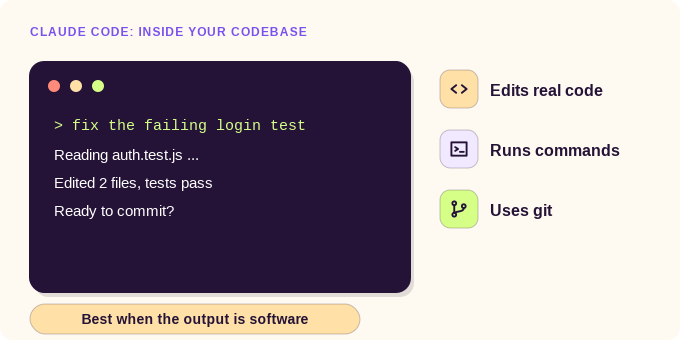
Claude Code lives inside a codebase. It reads your project, edits code, runs commands in a terminal and works with git. If the thing you are making is software, this is the one. It is also the route Anthropic points to when a task has to stay entirely on your own computer, since Claude Code is available in the desktop app.
- Build or fix an app or a website.
- Run tests and commands in a terminal.
- Keep your changes under version control with git.
Try it
Run the three-question test on a real task
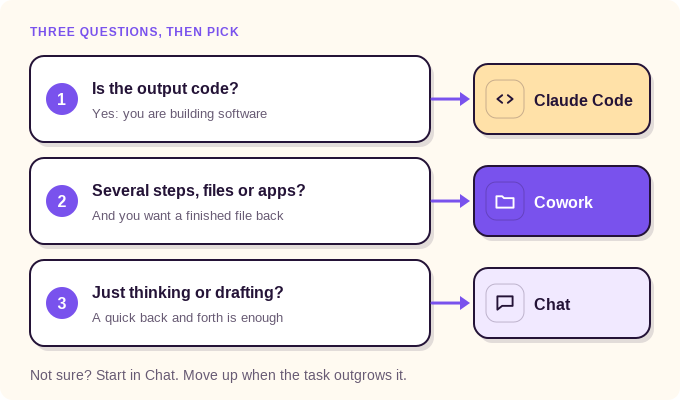
Take one task you actually have this week and run it through three questions. Is the output code? Does it take several steps across files or apps, ending in a finished file? Or are you just thinking and drafting? Open the tool that matches. Not sure? Start in Chat and move up when the task outgrows it.
- Write the task in one sentence, then answer the three questions.
- Open the match. If your Claude shows separate options, pick Cowork in the message box. If Chat and Cowork are one conversation, just describe the outcome. Cowork needs a paid plan (Pro, Max, Team or Enterprise), and the Claude desktop app for local files.
- In Cowork, connect one dedicated folder, ideally a copy of your files, and describe the finished result you want.
- Read the plan before you approve it, then check the file when it is done.
Get the free Chat, Cowork or Claude Code cheat sheet
The three-question test, a table of common jobs with the right tool for each, and a safe first-task checklist, on two pages you can print or paste into Claude.
 Cheat sheet2 pages. Print it or paste it into Claude.