
Choosing the right Claude model: Haiku, Sonnet, Opus or Fable
Claude has four models, and the biggest one is rarely the right pick. This guide shows what each model is best at, how each one uses your rate limit, and a simple way to test and move up only when the task needs it.
Based on the free Choosing the right Claude model tutorial from Claude Academy, rewritten and illustrated by Fer Patel.
Meet the models
The four models at a glance
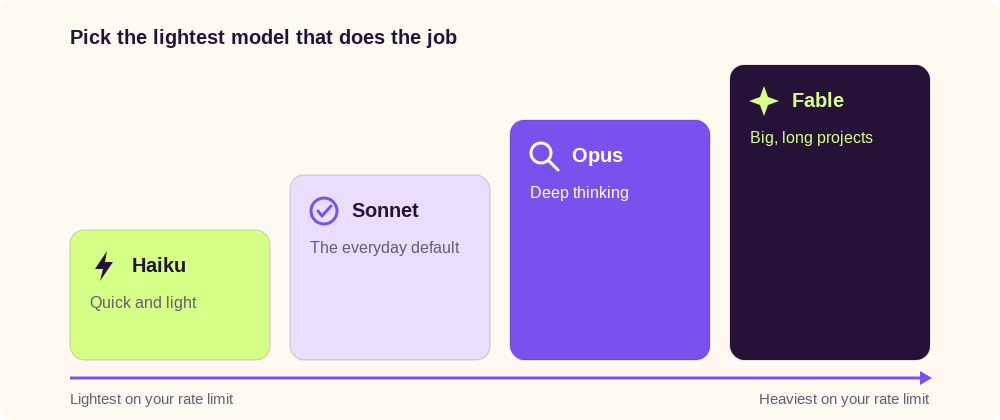
Claude comes in four models. They are not good, better and best. They are different tools. Haiku is the lightest, then Sonnet, then Opus, then Fable, which is the heaviest. Heavier means it thinks longer and uses up more of your rate limit on every message.
- Haiku: quick and light.
- Sonnet: the everyday default.
- Opus: deep thinking for hard problems.
- Fable: big, long projects that need planning.
Meet the models
What each model is best at
Think of the four as a toolbox. You would not use a sledgehammer to hang a picture. Match the weight of the model to the weight of the job.
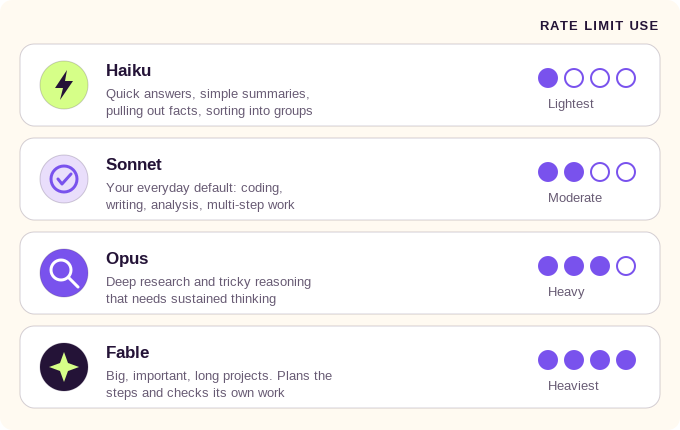
- Haiku: quick answers, simple summaries, pulling facts out of text, and sorting things into categories.
- Sonnet: coding, writing, analysis and workflows with several steps. This is the one to reach for first.
- Opus: deep research and complex reasoning where Claude needs to think for a long stretch.
- Fable: large, important, long-running projects. It plans the steps and checks its own work, so replies take longer.
Meet the models
See which plan unlocks which model
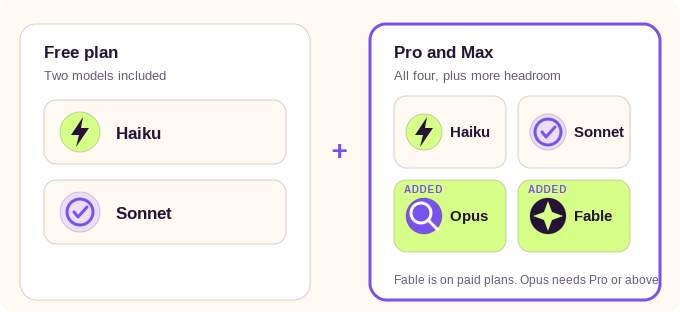
Not every model is on every plan. Free accounts get the two lighter ones. Paid plans add the heavy hitters and give you more room before you hit a limit.
- Free: Haiku and Sonnet.
- Pro and Max: all four, with more headroom. Opus needs Pro or above, and Fable is on paid plans.
- Open the model picker in Claude and check which ones your account shows. That is the list you can use today.
Match the task
Think in rate limit, not just quality
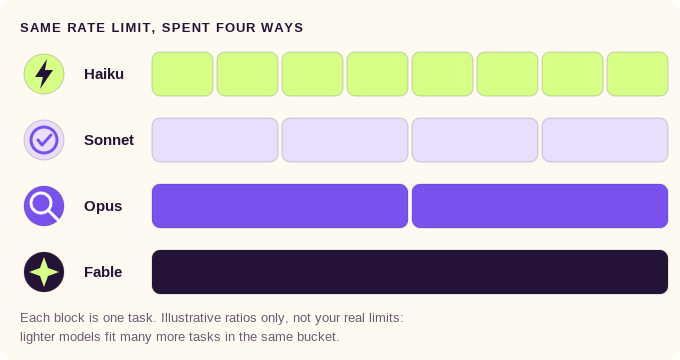
Your rate limit is one shared bucket. Every message draws from it, and heavier models draw more. If you use Opus or Fable for something Haiku or Sonnet could do, you burn your limit and wait longer for no real gain.
- Lighter models let you do many more tasks before the limit hits.
- The heaviest models are worth it when the job really needs them.
- Ask before each task: "Is this a hard problem, or just a long one?"
Match the task
See tokens and price side by side
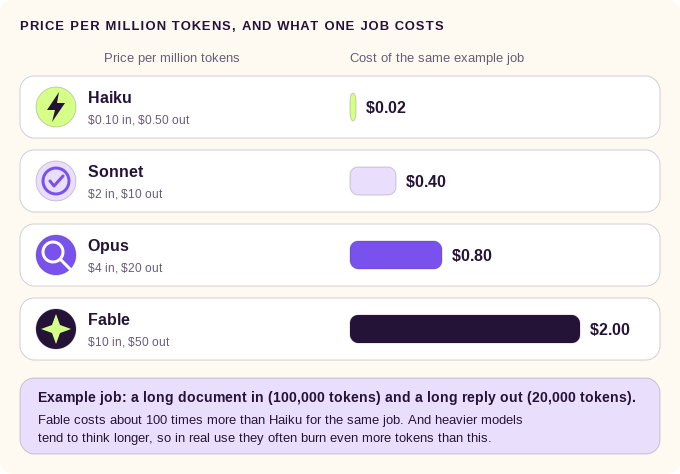
A token is a small piece of text, roughly three quarters of a word. Everything you send and everything Claude writes back is counted in tokens. Heavier models charge more per token, and they also tend to think longer, so one task can use more tokens on Fable than on Sonnet.
- Haiku: $0.10 per million tokens in, $0.50 out.
- Sonnet: $2 in, $10 out.
- Opus: $4 in, $20 out.
- Fable: $10 in, $50 out.
Those are the pay-as-you-go API prices. On a Free, Pro or Max plan you do not get a bill per token. The same ratio shows up as how quickly you use up your limit.
Match the task
Count your mileage
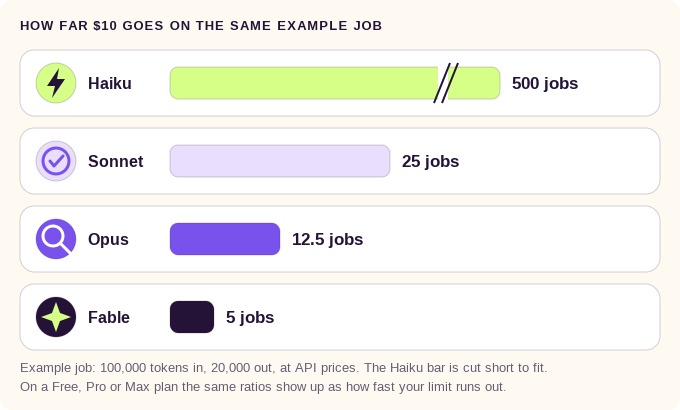
This is the part most people never see. Using the biggest model by default feels safe, but it quietly shrinks how much work you get done. The same budget buys very different amounts of work depending on the model.
- Haiku gets you about 20 times as many example jobs as Sonnet.
- Opus costs about twice as much as Sonnet per job, so you get half as many.
- Fable costs about five times as much as Sonnet, so you get a fifth as many.
- If you use Opus for everything, you are paying double for the jobs where Sonnet would have done the same.
Match the task
Match the model to the task
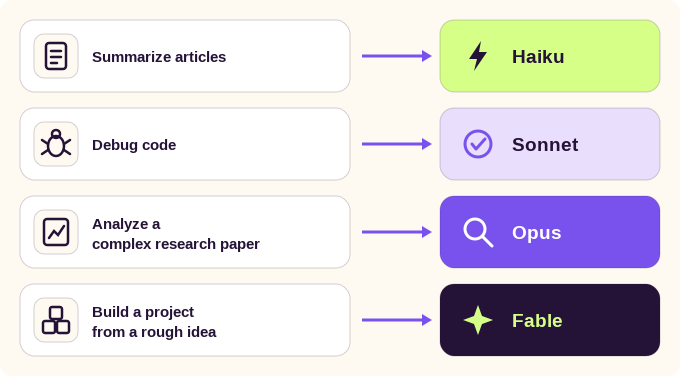
Here is a simple starting map. These are examples, not hard rules, so use them to build your own instinct for which model fits.
- Summarizing articles: Haiku.
- Debugging code: Sonnet.
- Analyzing a complex research paper: Opus.
- Building a project from a rough idea: Fable.
Match the task
See real jobs and the model that fits
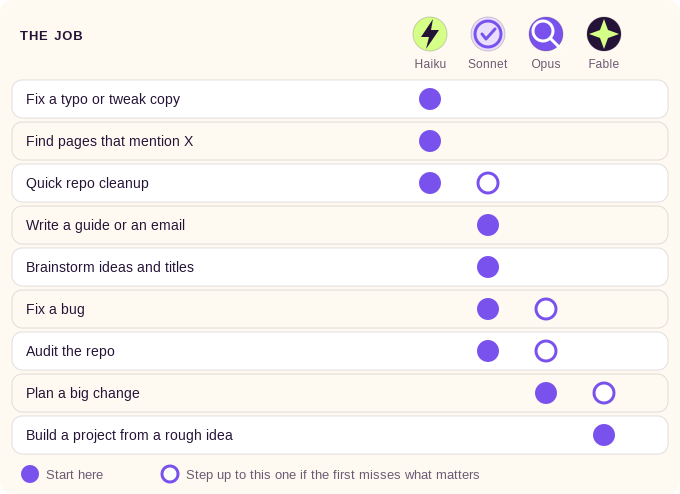
Here are common jobs and where to start. Filled dots are your first try. Hollow rings are where to step up if the first model missed something that matters.
- Quick edits, finding content, simple cleanup: Haiku. Mistakes are obvious and cheap to redo.
- Writing, brainstorming, bug fixes, repo audits: Sonnet. It needs real judgment but not marathon thinking.
- Risky areas of an audit, or a bug you have already failed to fix: step up to Opus.
- Planning a big change or building a whole project: Opus or Fable.
Match the task
Use the effort setting
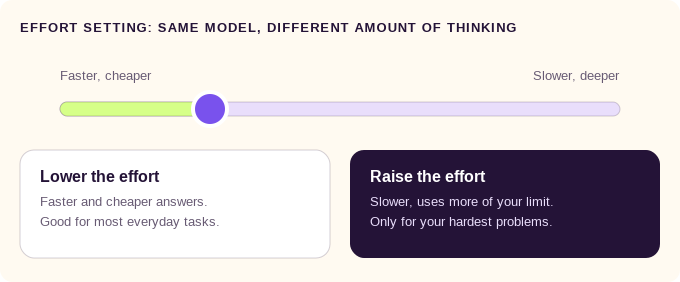
Besides picking a model, you can change how hard the model thinks. This is the effort setting. It is a second dial that works on top of your model choice.
- Lower it when you want a faster, cheaper answer.
- Raise it only for your hardest problems.
- If you are not sure, leave it where it is and change it only when an answer comes back too shallow.
Test it
Run the same task on two models
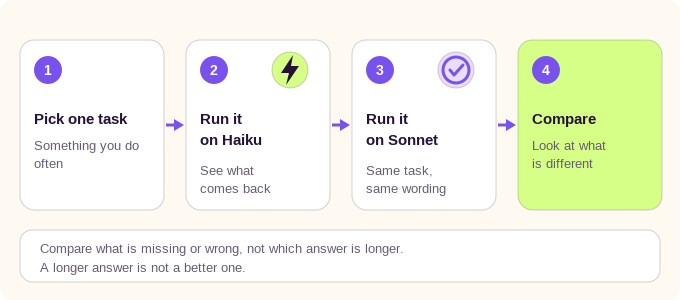
The best way to learn this is to try it. Pick a task you already do, run it on Haiku, then run the exact same request on Sonnet. Do not judge by who wrote more.
- Pick one real task you do often.
- Run it on Haiku and save the answer.
- Run the same wording on Sonnet.
- Put the two answers side by side and look at what each one missed, got wrong, or understood better.
Test it
Move up only when it misses
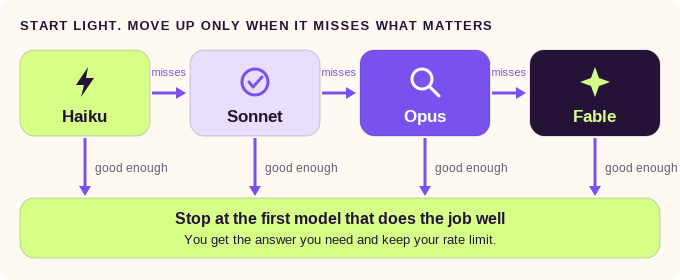
Start with the lightest model that could work. If it misses things that matter to you, step up one model and try again. If it does the job, stop right there and keep your limit.
- Haiku missing nuance? Try Sonnet.
- Sonnet running out of depth on a hard problem? Try Opus.
- A big, important project that needs planning and self-checking? Bring in Fable.
Test it
Retest now and then
Models keep getting better, and a task that needed Opus last year may now be fine on Sonnet. Every few months, rerun your go-to tasks on a lighter model and see if the answer still holds up.
- Keep a short list of your regular tasks and the model you use for each.
- Retest it when a new model ships, or when you keep hitting your limit.
- For a few topics, mainly some biology and security questions, Claude may switch you to a different model on its own. It tells you when it does.
Test it
Make the check automatic
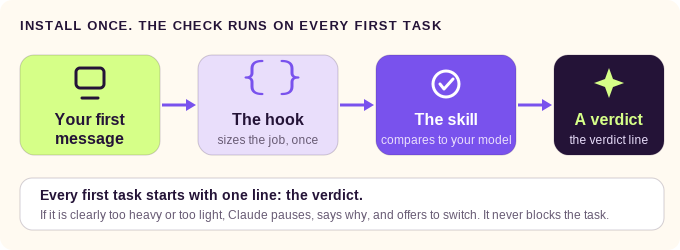
Everything above works, but only if you remember to do it. The free download includes a small skill and a hook that do the remembering for you. The skill holds the job chart. The hook nudges Claude to run it on your first task of each session.
- The skill (model-check): compares the model you are on with the job you just asked for. It always opens with one line, so you can see it ran. If the model fits, that line says so. If a lighter model could do the job, or this one is too light, it pauses with a two-sentence note, gives the saving as a percentage, and offers to switch.
- The hook: a tiny script that runs when you send your first real message of a session. It sizes the job from your own words (Haiku, Sonnet, Opus or Fable), shows you that verdict as a notice in the chat, and hands the same verdict to Claude so it only has to compare it with the model it is on. Short replies like "hi" and slash commands do not count.
- The installer: one command copies both into your
~/.claudefolder and adds the hook to your settings. It backs up your settings file first, and running it twice is safe.
To install, save the three files from your email (SKILL.md, model-check-hook.sh and install.sh) into one folder, open a terminal in that folder and run:
bash install.shThen start a new Claude Code session. This works in Claude Code. In the Claude app on the web or desktop chat, paste the cheat sheet's starter prompt at the top of a conversation instead.
~/.claude.Get the free model cheat sheet and model-check skill
The job table, the price table and the effort rules on one page, plus the skill, hook and installer from step 13 that run the check for you.
 Cheat sheet2 pages. Print it or paste it into Claude.
 Model-check skillA SKILL.md that checks the model against the job.
 HookSizes your job from your own words and runs the check on your first task of each session.
 InstallerOne command sets up the skill and the hook.