
What is CLAUDE.md? A plain-English guide
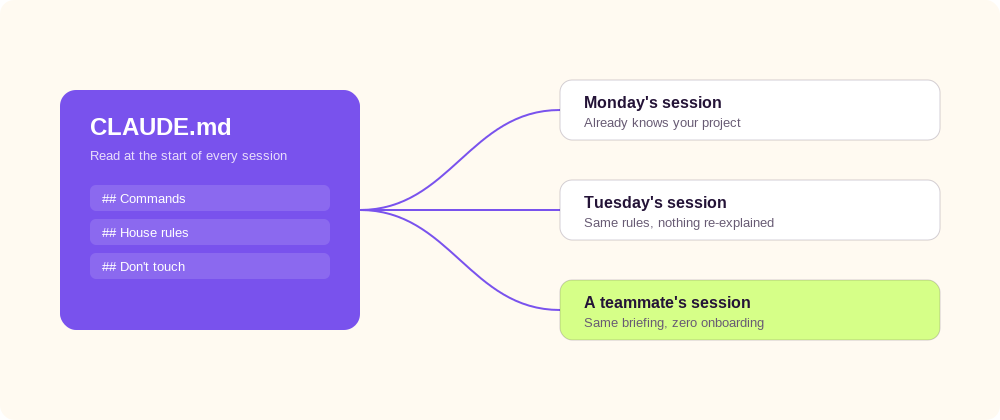
CLAUDE.md is a short note that Claude Code reads every time you start a session, so you stop explaining your project over and over. This guide shows what it is, where it lives, what to put in it, and the part most people skip: keeping it lean and up to date.
Understand it
Know what CLAUDE.md is
CLAUDE.md is a plain text file with Markdown headings. Claude Code reads it on its own at the start of every session. You don't paste it in and you don't remind it. Think of it as the onboarding note you would hand a new hire on day one, except Claude reads it every single morning.
- It is not documentation. It is a short briefing: how to run things, your house rules, and what not to touch.
- The name must be exactly
CLAUDE.md, in capitals. - Other AI coding tools read a similar file called
AGENTS.md. Step 10 shows how to use both.
Understand it
See why everyone needs one
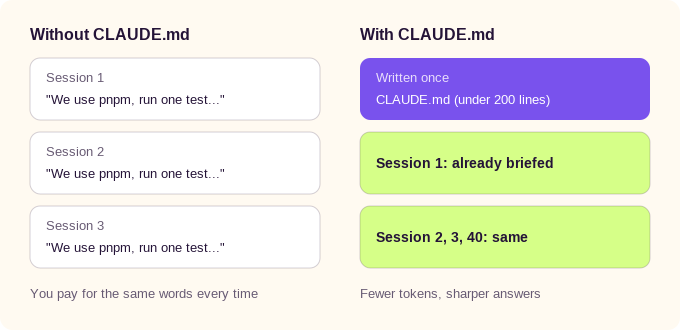
Count how often this week you told Claude your test command, your package manager, or which folder to leave alone. Every one of those repeats costs you time and tokens. A CLAUDE.md says it once and it holds for every chat after that.
- No repeating yourself. One file instead of the same paragraph pasted into 40 chats.
- Fewer tokens, sharper answers. Claude starts briefed instead of guessing.
- Everyone gets the same rules. A new hire, a contractor and your most senior person all start from the same briefing.
- Fewer surprises. The mistakes Claude kept making become one line it reads first.
Understand it
Learn the three levels
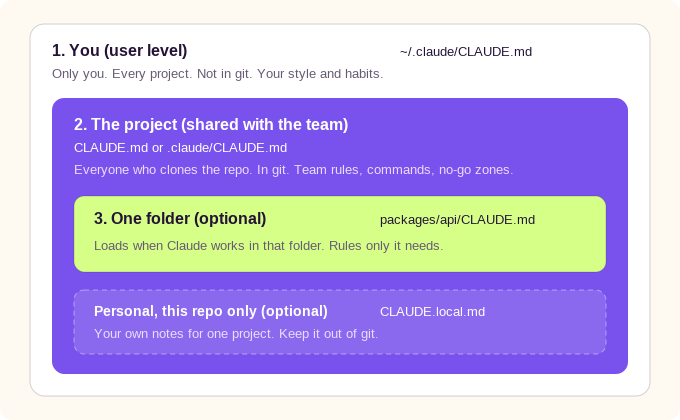
CLAUDE.md is not one file in one place. It can live at three levels, and where you put it decides who it applies to. Picture boxes inside boxes: you, then the project, then one folder inside the project.
- You:
~/.claude/CLAUDE.mdin your home folder. Applies to every project you open. Not in git, so nobody else gets it. Use it for your style: how short you like answers, how you like commits written. - The project:
CLAUDE.mdin the project root, or.claude/CLAUDE.md. Both work. It lives in git, so everyone who clones the repo gets it. Team rules go here. - One folder: a
CLAUDE.mdinside a subfolder such aspackages/api/. Loads only when Claude works in that folder. - Bonus:
CLAUDE.local.mdnext to a project CLAUDE.md holds your personal notes for that one repo. Add it to.gitignore.
Can't see the .claude folder? (Mac)
Folders that start with a dot are hidden by default. Open Finder, go to your home folder or your project folder, and press Command + Shift + . (period) to show them. Press it again to hide them.
Understand it
Know how the levels add up
This part surprises people. The files don't replace each other. Claude Code stacks every one it finds into the same context, broadest first, and reads them all together. There is no rule that the closer file wins.
- All matching files load together: yours, the project's, and the folder's when you work there.
- If two files contradict each other, Claude may pick either one. Fix the contradiction instead of hoping.
- CLAUDE.md is advice. Claude follows it most of the time, but nothing forces it. Step 9 covers rules that must hold every time.
- After
/compact, the project file is read again from disk. Folder files come back when Claude next works in that folder. Rules you only typed in chat can get lost, so put the important ones in a file.
Write it
Generate a starter file with /init
You don't have to start from a blank page. Open Claude Code in your project and run /init. It reads your code and writes a first CLAUDE.md for you. Treat that as a rough draft: it usually says too much.
- Open a terminal in your project folder and run
claude. - Type
/initand let it finish. - Open the new CLAUDE.md and cut anything Claude could have found by reading the code (step 6 shows what).
- Aim for under 200 lines. Shorter is better.
Write it
Keep only what Claude can't guess
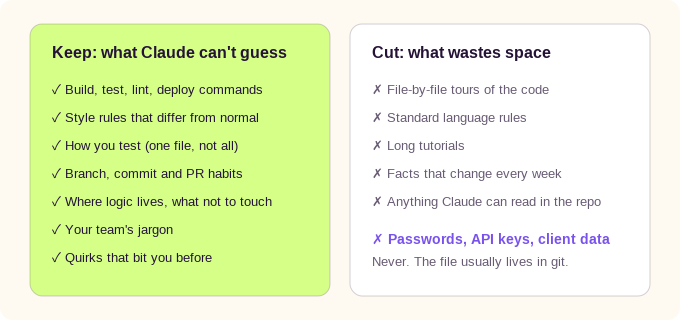
The rule of thumb: include what Claude can't work out by itself, and cut everything else. A bloated file is worse than a short one, because the rules that matter get lost in the noise and Claude starts ignoring them.
- Keep: commands, style rules that differ from normal, how you test, branch and commit habits, where key logic lives, what not to touch, your team's jargon, and the quirks that bit you before.
- Cut: tours of each file, standard language rules, long tutorials, and facts that change every week.
- Ask: "What does every new person get wrong here?" That is probably your most useful line.
Write it
Write rules you could check
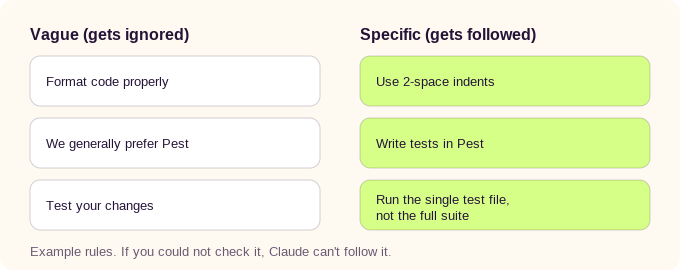
Vague rules get followed some of the time. Specific ones get followed. Write each line as an instruction, not a description, so you could look at Claude's work and say yes or no.
- Swap "properly", "generally" and "try to" for an exact instruction.
- If Claude keeps ignoring one rule, add
IMPORTANT:to that line only. - Use that word once or twice in the whole file. If everything is important, nothing is.
Write it
Use a simple layout
A good CLAUDE.md reads top to bottom like a briefing: how to run things, the house rules, where things live, then the one or two hard limits. Here is the shape of one, cut down to the essentials.
- Commands go first, because Claude needs them most.
- Then house rules, where things live, and your team's words.
- End with the one or two hard limits, so they are easy to find.
- Want the full layout with every section? The free starter kit has a fill-in-the-blanks CLAUDE.md ready to drop in.
# My Shop App

## Commands
- Run one test file: pnpm test path/to/file.test.ts
- Lint before every commit: pnpm lint

## House rules
- 2-space indents, named exports only
- Never commit to main. Open a pull request.

## Hard limits
- IMPORTANT: Never edit anything in src/billing/legacy/
Maintain it
Put each rule in the right place
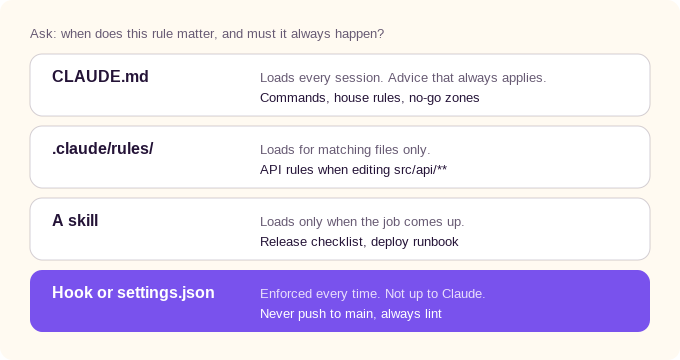
Not everything belongs in CLAUDE.md. It loads every session, so it should hold only what always applies. Claude Code has other places for rules that matter sometimes, and for rules that must never be broken.
- CLAUDE.md: advice that applies every session.
.claude/rules/: topic files, such astesting.md. Add apaths:line at the top and the file loads only when Claude works on matching files.- A skill: a process you need now and then, like a release checklist. It loads only when the job comes up.
- A hook or
settings.json: anything that must happen every time, like "never push to main". These are enforced by Claude Code itself, not left to Claude's judgement.
Maintain it
Split it up with @ imports
When the file grows, split it into topic files and pull them in. Write @ followed by a path on its own line, and that file is read in as if you had pasted it there. There is no @import keyword, just the @.
- Good topic files:
product.md(customers, business rules, jargon),design.md(colors, components, accessibility),architecture.md(how the parts fit and why). - Imports keep things tidy but don't save any space. Everything imported still loads every session.
- Keep imports one level deep. Imports can chain, but only a few levels, and a long chain is hard to follow.
- Using other AI tools too? Keep shared rules in
AGENTS.md, put@AGENTS.mdat the top of CLAUDE.md, then add only the Claude-specific bits below it. Don't copy the text across.
Maintain it
Check what actually loaded
Don't assume a file is working. Claude Code can show you exactly which instruction files it read, so you can catch a wrong name, a typo in a path, or a rule in the wrong level.
- Run
/memoryto see where your CLAUDE.md files are and open any of them in your editor. - Run
/contextand look under Memory files to see what loaded when the session started. - Folder-level files and path-scoped rules load later, when Claude touches a matching file. Watch for a "Loaded" line in the terminal.
- Neither command loads anything. They only show you what is already there.
Maintain it
Keep it fresh
This is the step most people skip. A CLAUDE.md that was right in March and wrong in June is worse than none, because a dead path or old command misleads every session. Treat it like code: small, reviewed, and cleaned up on a schedule.
- When Claude gets something wrong, check this file first. Then add or fix one line so it doesn't happen again.
- When you change how things work, such as a new test command or a renamed folder, update CLAUDE.md in the same change.
- Once a month, read it top to bottom and cut anything stale. The free starter kit has the full ten-minute checklist and a 10-question scorecard.
- Review changes like code. The project file goes through a pull request, the same as everything else.
Get the free CLAUDE.md starter kit
A fill-in-the-blanks CLAUDE.md, the monthly upkeep checklist and a 10-question scorecard. Next, see where skills fit in the skills guide.
 CLAUDE.md templateEvery section laid out, with a bracket where your details go.
 Starter kit PDF3 pages: keep vs cut, monthly checklist and a 10-question scorecard.