
From Claude Code session to production
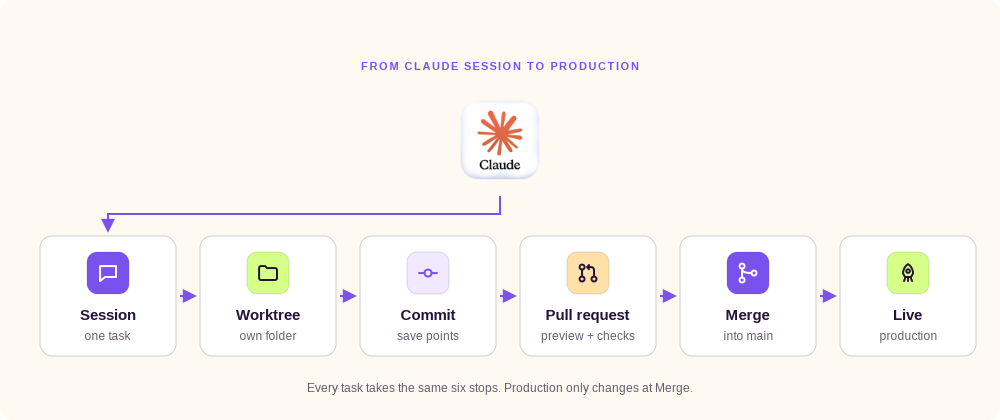
Commit, push, merge, worktree: you have heard the words, but which one actually changes your live site, and when? This guide walks one task from a fresh session all the way to production, then cleans up after it, so every task you give Claude lands the same safe way.
New to this? Start with step 13: a play-by-play of one real bug fix, showing exactly what you type at each stage. Then come back to the steps.
Start it right
Learn the words, with one map
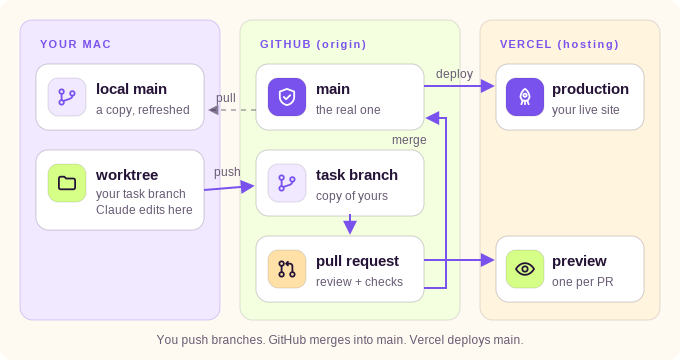
Most of the confusion comes from three places that all have something called "main": your Mac, GitHub and your hosting. Once you can see which place each word lives in, the whole flow makes sense. Here is the short version.
- Repo: your project folder plus its full history. The copy on GitHub is called origin.
- main: the branch that is your live site. The real one lives on GitHub. Your Mac only holds a copy.
- Branch: a separate line of work, so you can change things without touching main.
- Worktree: a second folder of the same repo, checked out on its own branch. One task, one folder.
- Commit: a save point on your branch. It stays on your Mac.
- Push: upload your branch's commits to GitHub.
- Pull request (PR): a request to fold your branch into main. It shows the changes, runs automatic checks and gets a preview link.
- CI: the automatic checks that run on the PR (tests, lint, safety gates).
- Merge: GitHub folds the PR into main. With hosting like Vercel, that is also the deploy.
- Pull: download what changed on GitHub into your local copy.
Start it right
Pull the latest, then open a worktree
Every task starts from the newest version of main, in its own folder. Starting from an old copy is the number one cause of painful merges later. A worktree lets you run three or four Claude sessions at once without them editing the same files under each other.
- Desktop app: start a new session and turn on the worktree option. Then ask Claude: "fetch origin and confirm this worktree is on the latest main."
- Terminal: use the commands below, then start
claudeinside the new folder. - Name the branch after the task:
fix-footer,pricing-page. Nottestorstuff. - One task per session. A new, unrelated idea gets its own session and worktree.
# 1. Get the latest from GitHub
git fetch origin

# 2. New folder + new branch, starting from GitHub's main
git worktree add ../my-site-fix-footer -b fix-footer origin/main

# 3. Work there
cd ../my-site-fix-footer
claude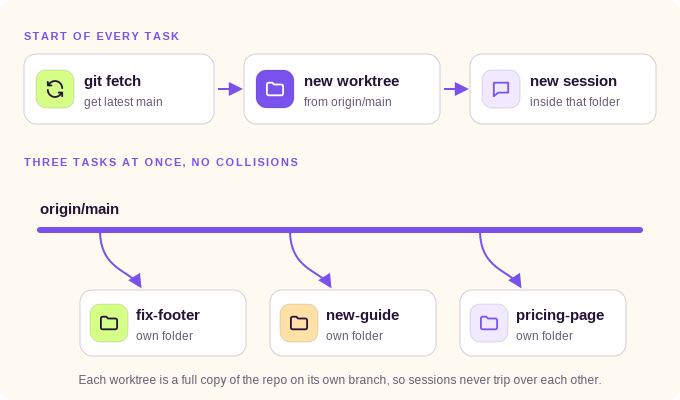
Why your main keeps ending up "100 commits behind"
Every time a PR merges, GitHub's main moves forward. Your local main does not. It only moves when you pull, and if you do all your work in worktrees, nothing ever pulls it. A few weeks of merges later, your editor says it is 100 commits behind. That is not damage, but it bites when a tool starts a new worktree from your local main, because then the new task starts 100 commits out of date and every merge gets harder.
- Daily habit: before your first session, in your main project folder, run the line below. It takes seconds.
- Never commit on local main. One stray commit there makes the pull refuse to update (that is what
--ff-onlyprotects you from), and it stays stuck from then on. - Stuck already with no work of your own on main? Ask Claude: "reset my local main to match origin/main". If it says main has commits of its own, move them to a branch first.
- Step 12's cleanup ends with a pull too, so main catches up after every task.
git switch main && git pull --ff-only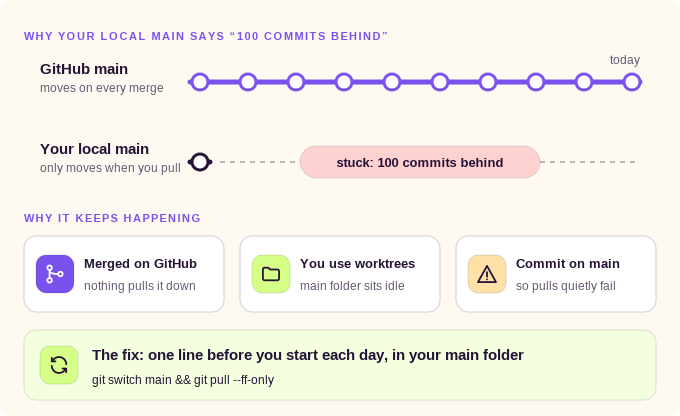
main branch. If Claude says "On branch main" before it edits anything, stop and open a worktree first.Start it right
Give Claude a brief, not a wish
"Make the pricing page better" gets you a guess. A short brief gets you the thing you meant, and tells Claude what not to touch. If you have a PRD, paste it under Context, but still write the Goal and Done lines yourself, because those are what you will check against.
- Keep each answer to a line or two. Six headings, not six pages.
- For anything bigger than an afternoon, write a PRD instead. Step 14 shows what one looks like, with a full example.
- Flag risk out loud: payments, logins, the database, anything clients see.
GOAL: (one sentence, the outcome)
DONE LOOKS LIKE: (what I will check in the preview)
IN SCOPE / OUT OF SCOPE: (what to change, what to leave alone)
CONTEXT: (files, links, PRD, screenshots)
RISK FLAGS: (payments, auth, data, client-facing? say so)
HOW TO VERIFY: (preview pages to open, tests to run)

Ask me before guessing on anything unclear.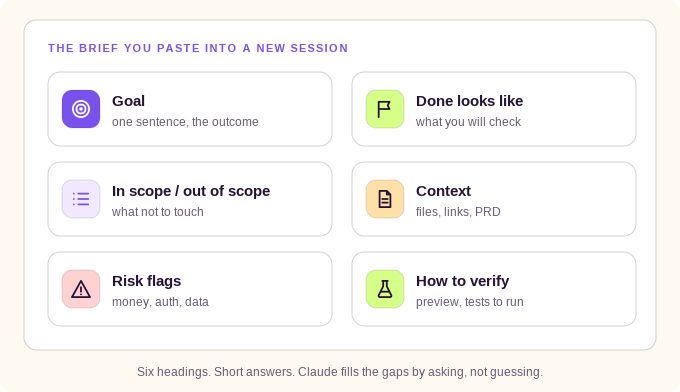
Build and ship
Read the diff, not the chat
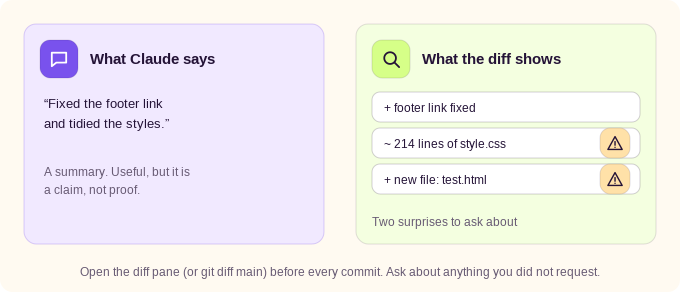
When Claude says "done", that is a summary. The diff is the proof: every line added, changed or removed. Reading it takes two minutes and catches the surprises, like a rewritten stylesheet or a stray test file you never asked for.
- Desktop app: open the diff pane. Terminal: ask Claude to run
git diff origin/main --stat, then show the details of anything surprising. - Ask about any file you did not expect to change.
- You do not need to understand every line. You need to know nothing extra slipped in.
Build and ship
Preview it from the worktree
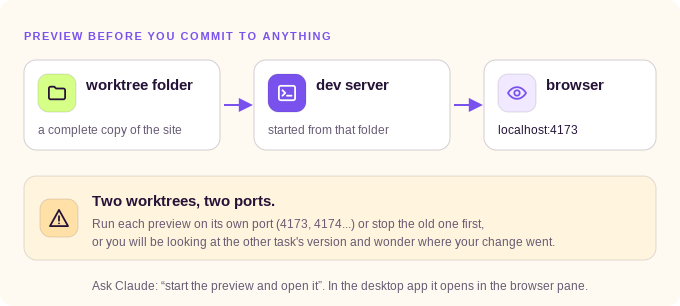
A worktree is a complete copy of your project, so you preview it the same way you would preview main: start the dev server from inside that folder and open it in a browser. Nothing is on GitHub yet, and nothing is live.
- Ask Claude: "start the preview and open it." In the desktop app it opens in the browser pane next to the chat.
- Click through the exact thing you asked for, on desktop and phone width.
- Running two worktrees at once? Give each its own port, or stop the old server first.
Build and ship
Commit in small save points
Once the preview looks right, commit. A commit is a save point on your branch with a short message saying what changed. Small commits make it easy to undo one piece without losing the rest. Committing never touches your live site.
- Ask Claude to commit with a plain message: "Add pricing table", not "updates".
- Commit after each piece that works, not once at the very end.
- Never commit
.envfiles or keys. Make sure.gitignorecovers.env*.
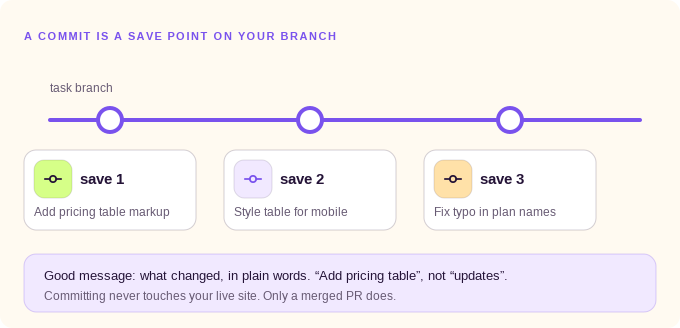
git log --oneline origin/main..HEAD lists your commits, each one readable without opening it.Build and ship
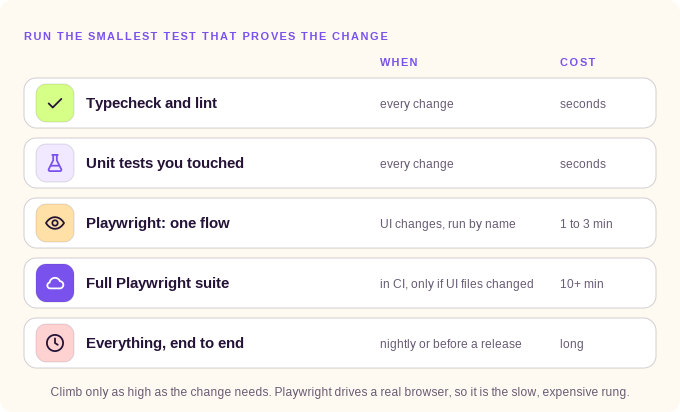
Run the smallest test that proves it
Tests are a ladder. The bottom rungs take seconds and should run on every change. The top rungs drive a real browser and take minutes, so they should only run when the change needs them. Running the whole ladder after every edit is how a session that should take 10 minutes takes an hour.
- Every change: typecheck, lint, and the unit tests for the files you touched.
- UI changes: run only the browser test for the flow you changed, by file name.
- Leave the full browser suite to CI, and only when UI files changed. Step 14 shows how.
- Write the rule into your project's
CLAUDE.mdso Claude follows it without being told.
Build and ship
Catch up, push once, open the pull request
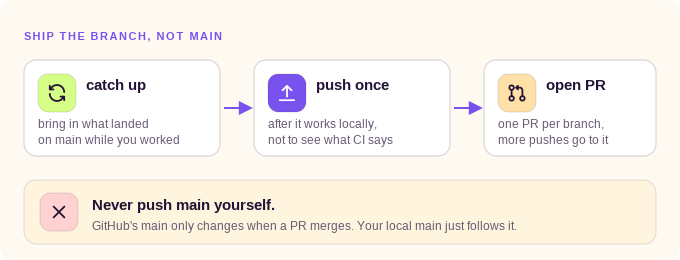
While you worked, other tasks may have landed on main. Bring those changes into your branch first, check it still works, then push your branch and open one pull request. This is the step people get wrong most: you push the branch, never main.
- Ask Claude: "fetch origin, bring this branch up to date with origin/main, re-run the quick checks."
- Then: "push this branch and open a PR." One PR per branch. More fixes go to the same PR.
- Finish locally before you push. Every push re-runs CI, and CI minutes cost money.
Build and ship
Treat the pull request as your staging
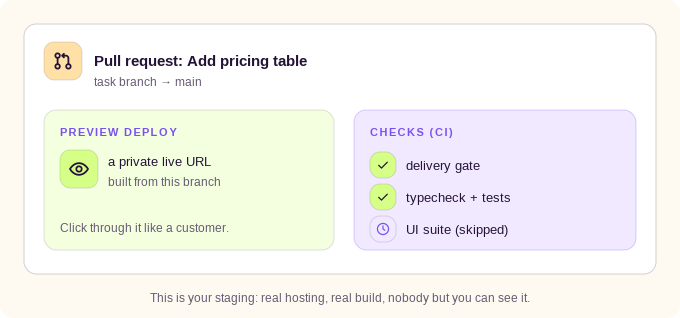
With Vercel (and most modern hosts) connected to GitHub, every PR gets its own preview deploy: a private live URL built from your branch, on real hosting. That is your staging environment, one per task, gone when the PR closes. Click through it like a customer would.
- Open the preview link from the PR and test the change again, on your phone too.
- Wait for every check to go green. A skipped check is fine. A red one is not.
- If CI fails, ask Claude to read the failing log and fix it on the same branch.
Build and ship
Merge the pull request, which is the deploy
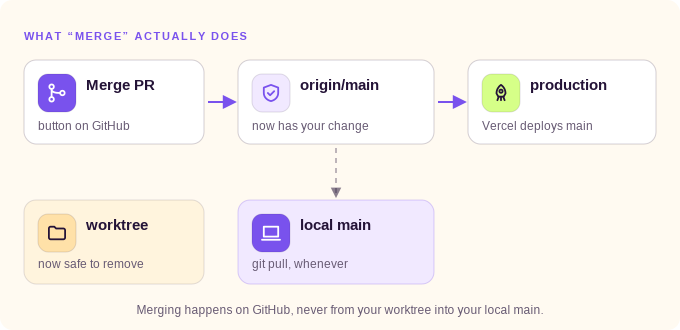
Merging happens on GitHub, not on your Mac. You do not merge your worktree into your local main. When you click Merge on the PR, GitHub folds your branch into its main, and your host sees the new main and deploys it to production. Your local main is just a copy that catches up whenever you run git pull.
- Use "Squash and merge" so the whole task lands as one tidy commit on main.
- Only merge when the preview looked right and every check is green.
- Payments, logins, database changes or webhooks in the PR? Say so in the description and test the preview twice.
Build and ship
Check production, and know how to roll back
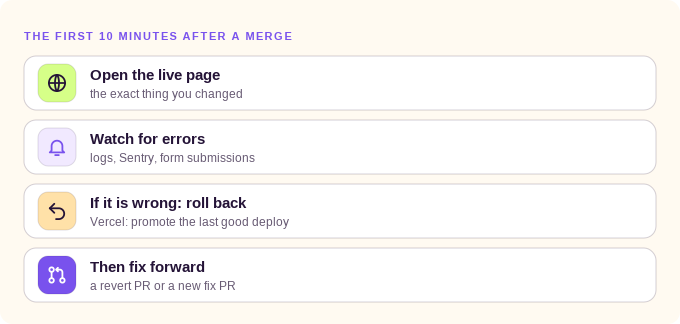
The first few minutes after a merge are when you find out if something behaves differently on the real domain. Look at the live page yourself. If it is wrong, roll back first and investigate second, so customers stop seeing the problem right away.
- Open the exact page you changed on the live site, logged out, on your phone.
- Glance at errors: hosting logs, Sentry if you use it, a test form submission.
- Broken? On Vercel, promote the previous good deployment back to production. Then fix forward with a new PR or a revert PR.
Build and ship
Clean up the worktree
A merged task leaves behind a folder, a branch and maybe a preview server. Left alone, they pile up: dozens of folders, old ports in use, and sessions you can no longer tell apart. Clean up as the last move of every task, the same way you started it.
- Confirm the PR merged first. Never remove a worktree with an open PR or unsaved work.
- Easiest: tell Claude in that session, "the PR merged, clean up this worktree and branch."
- Then archive the session, so the sidebar only shows work that is still live.
# Run from your main project folder, not the worktree

# 1. Confirm it merged (should print MERGED)
gh pr view fix-footer --json state -q .state

# 2. See your worktrees, then remove this one
git worktree list
git worktree remove ../my-site-fix-footer

# 3. Delete the local branch (-D: squash merges look unmerged to git)
git branch -D fix-footer

# 4. Tidy up and refresh your local main
git worktree prune
git switch main && git pull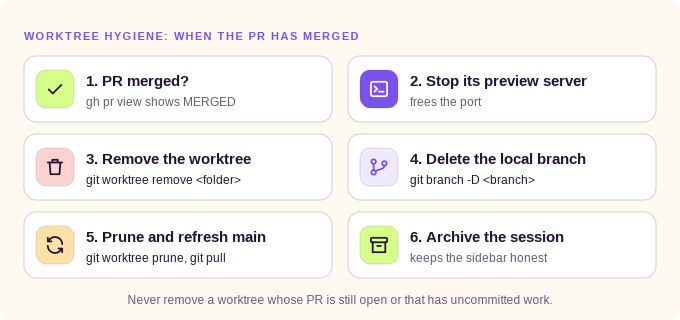
git worktree list shows only your main folder and tasks still in progress.Build and ship
Watch a full bug-fix session, start to finish
Here is everything above in one real example, so you can see exactly what you type and what comes back. A customer emails: "I signed in and got a blank page." You do not need a PRD for a bug. A PRD describes something new to build (step 14 shows one). A bug needs a bug report: what broke, how to make it happen, and the evidence. Then you ask Claude to find the cause before it changes anything.
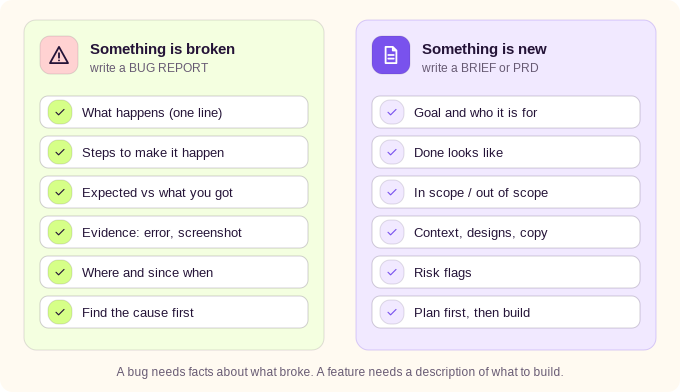
BUG: After signing in, some customers land on a blank page
instead of their dashboard.

STEPS:
1. Go to /login
2. Sign in with a customer account (use the test account)
3. Expected: the dashboard loads. Actual: a blank white page.

WHERE AND SINCE WHEN: production, Chrome and Safari.
Started yesterday, after the pricing update went live.

EVIDENCE: customer screenshot attached. The browser console
shows "Cannot read properties of undefined (reading 'plan')".
About 3 customers so far.

WHAT I WANT:
- Find the cause first. Show me what is wrong and your fix
  plan before changing any code.
- Smallest fix that solves it. Do not refactor anything else.
- Add a test that fails before the fix and passes after.
- Do not commit or push until I say so.

RISK: this is the sign-in flow. Be careful.
Now watch the whole session play out. Each frame shows what you type, what Claude replies, and what you should see. It loops, and ends on the five phrases that carry the whole session.

The same session, written out:
- Start. In your main folder, pull main. Start a new session with the worktree option on.
- You paste the bug report. Claude investigates and replies with the cause and a plan, without changing code yet.
- You: "Go ahead and fix it." Claude makes the change and adds a test that proves it.
- You: "Show me the diff and start the preview." You sign in with the test account yourself and see the dashboard load.
- You: "Looks good. Commit it." A save point on your branch. Nothing is live.
- You: "Update from main, push, and open a PR." Claude replies with the PR link.
- You open the preview link inside the PR, sign in there too, and wait for the checks to go green.
- You: "Checks are green. Merge it." This is the push to production. Vercel deploys main.
- You sign in on the live site. Then: "It is live and working. Clean up this worktree." Archive the session.
Optional best practices
Write a PRD before you build something new
PRD stands for Product Requirements Document. It sounds formal, but it is just a page in plain English that says what you are building, what "done" looks like, and what to leave alone. You write it before any code. For a small fix, the six-line brief from step 3 is enough. For anything new that will take more than an afternoon (a page, a feature, a tool), write a PRD first.
Why bother? Claude builds exactly what you describe, and fills every gap with a guess. A PRD closes the gaps before they become rewrites. It stops "while I'm here" changes, gives you a list to check the result against, and lives in your project, so every future session can read it instead of you explaining it all again.
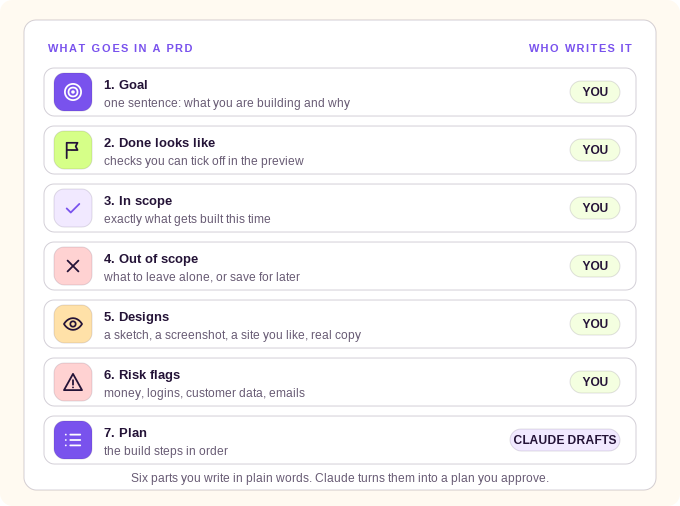
- Goal: one sentence on what you are building, for whom, and why.
- Done looks like: a checklist you can tick off in the preview. If you cannot check it, rewrite it.
- In scope / out of scope: what gets built now, and what Claude must not touch or should save for later.
- Designs: a sketch on paper, a screenshot, a site you like, and the real words that go on the page.
- Risk flags: anything that touches money, logins, customer data or emails.
- Plan: the build steps in order. Claude drafts this after reading the rest, and you approve it before any code.
See an example PRD: a waitlist signup
A complete PRD for adding a waitlist box to a homepage. Copy it as a starting point and swap in your own project.
# PRD: Waitlist signup on the homepage

GOAL
Collect names and emails from homepage visitors who are not
ready to buy, so we can email them when the new course opens.

DONE LOOKS LIKE
- A "Join the waitlist" box appears under the homepage hero.
- First name, email, one button. Looks right at phone width.
- Submitting shows "You're on the list" without leaving the page.
- The signup arrives in our email tool tagged "course-waitlist".
- Signing up twice with the same email creates no duplicate.

IN SCOPE
- The signup box on the homepage only.
- Sending name, email and the tag to the email tool.

OUT OF SCOPE
- No changes to checkout, prices, or the header and footer.
- No launch-day email yet (separate task).
- No admin page to view signups.

DESIGNS
- Match the existing "free download" boxes on the site.
- Headline: "Be first in line". Button: "Join the waitlist".
- Screenshot of a signup box I like is attached.

RISK FLAGS
- Collects personal data: add the privacy line under the button.
- Uses the email tool's API key: server side only, never in
  the page.

PLAN (Claude drafts, I approve)
1. Read the existing free-download form and reuse its pattern.
2. Build the box and the success message.
3. Connect it to the email tool on the server.
4. Test: new signup, repeat signup, phone width.
5. Open a PR with before and after screenshots.
Never written one? Let Claude interview you
You do not need to know the format. Paste this into a new session, answer the questions, and Claude writes the PRD for you to review.
I want to build: (one or two rough lines about your idea)

Interview me to write a PRD with these sections: Goal,
Done looks like, In scope, Out of scope, Designs, Risk flags.
Ask one question at a time, in plain English, and suggest an
answer I can accept or change. Then draft a Plan section.

When we're done, save it as docs/prds/(short-name).md and
stop. Do not build anything yet.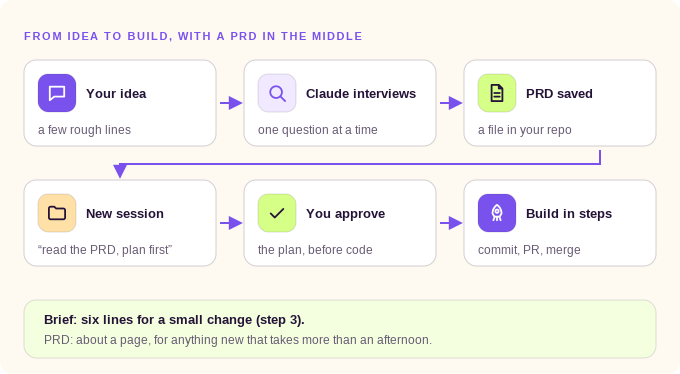
- Read the PRD Claude wrote and cut anything you do not actually want. Shorter is better.
- Start the build in a new session and worktree: "Read docs/prds/waitlist.md. Draft the plan, show me, and wait for my OK before writing code."
- From there it is the normal path: diff, preview, commit, PR, merge.
docs/prds/ where every "done" line is something you could check in the preview, and a plan you approved before any code was written.Optional best practices
Check what else is in flight
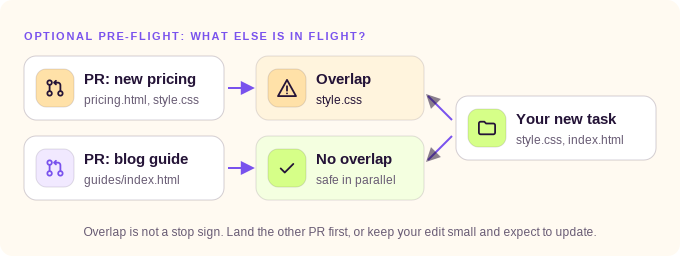
Optional, but worth it once you run several sessions at a time. Before a big task, look at your open PRs and the files they touch. If another PR is already rewriting the same file, you will save time by landing that one first or keeping your edit small.
- Ask Claude: "list my open PRs and the files each one touches. Does my task overlap any?"
- Overlap on a shared file (a stylesheet, a nav, a sitemap) is normal. Expect to update your branch before merging.
- Overlap on the same function or page section means finish one first.
Optional best practices
Add Playwright for browser testing
Playwright is a free, open-source tool from Microsoft that drives a real browser (Chrome, Firefox or Safari's engine) through your site: it opens pages, clicks buttons, fills forms and checks the result. You write the steps once, and it repeats them every time, with a screenshot and a step-by-step trace when something breaks. It catches the failures that matter most and that other tests miss: a checkout button that stopped working, a signup form that no longer submits, a login loop.
We highly recommend it for any site that takes money, signups or logins. The trick is to run it at the right moments, because a real browser is slow.
- Start small: three to five tests for the paths that make money or collect leads. Not every page.
- On your Mac: run one test file by name for the flow you changed, never the whole suite after every edit.
- On PRs: run the suite only when UI or test files changed, using a path filter (below), and cache the browser download.
- Nightly: run everything once a day. Not on every push to main, since the PR already ran it.
- Never in a pre-commit hook, and never against production with real payments. Use test mode on the preview URL.
on:
  pull_request:
    paths:
      - "src/**"
      - "tests/e2e/**"
      - "playwright.config.*"
      - "package-lock.json"
  schedule:
    - cron: "30 3 * * *"   # full run once a night
workflow_dispatch: # run by hand when you want## Browser tests (Playwright)
- Only run Playwright when the change touches UI files.
- Run one spec by name for the flow you changed:
npx playwright test tests/e2e/checkout.spec.ts
- Never run the full suite locally unless I ask. CI runs it.
- A failing test means fix the code, not the test.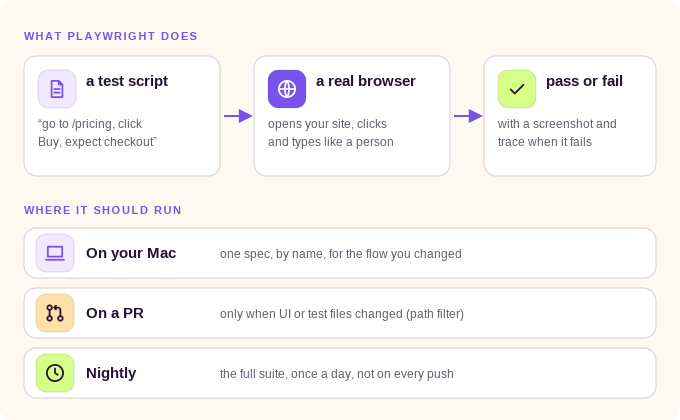
paths: filter, a workflow that runs on both the PR and the push to main, and a CLAUDE.md or hook telling Claude to run every test after every change.Optional best practices
Before your first client, add a safety net
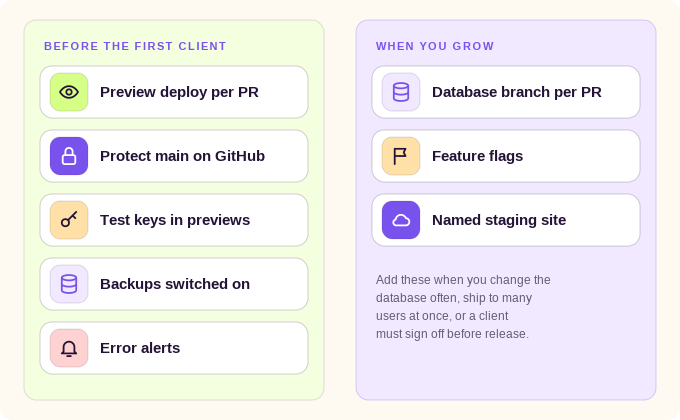
Solo with no customers, a merged PR is a fine first test. The day real clients rely on it, you want a few cheap guards in place first. You do not need a big, separate staging server on day one. Per-PR previews give you staging for free. Add the rest of the list below before you go live.
- Protect main on GitHub: require a PR and green checks, so nobody (including Claude) can push straight to it.
- Test keys in previews: previews use Stripe test mode and test API keys. Live keys only in production.
- Backups on for your database, and know how to restore one.
- Error alerts (Sentry or your host's alerts), so you hear about breakage before a client does.
- Later: a database branch per PR when you change the schema often, feature flags for risky launches, and a named staging site once a client must sign off before release.
Get the Claude session playbook
The full brief template, a ready CLAUDE.md "how we ship" block, the start and cleanup commands, and the Playwright setup, free in your inbox.
 Brief, PRD and bug templatesThe task brief, the PRD interview prompt and the bug-fix script.
 CLAUDE.md "how we ship" blockKeeps Claude off main and on the smallest test that proves a change.
 Two checklistsOne for shipping each task, one for before your first task.