
Let two Claude Code sessions message each other
Claude Code sessions can now send plain-text messages to each other. One session can pass the exact fact that unblocks another, with no copying between terminals. This guide sets it up and tests it with two real sessions.
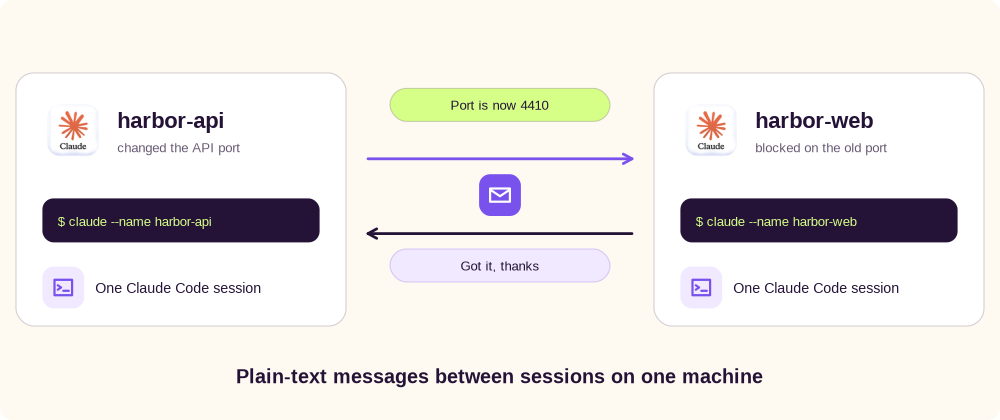
The idea
Spot the handoff problem
You often run two Claude Code sessions at once, say one on the back end and one on the front end. The back-end session changes the API port, and the front-end session is stuck on the old one. Until now you were the courier, copying that fact from one terminal to the other. Cross-session messaging lets one session send it straight to the other.
- Think of one small fact that a session knows and another is waiting for: a port, a URL, a table name, or "the migration is done".
- Without messaging, you copy and paste it by hand.
- With messaging, you ask the first session to send it, and the second one reads it.

The idea
Check what you need
Messaging switches itself on once you meet the requirements. There is no setting to enable. You need a recent Claude Code on macOS, Linux or WSL 2, with both sessions on the same computer.
- Run the command below. You need version 2.1.224 or newer. Native Windows needs 2.1.234 or newer.
- If you reach Claude through Bedrock, Vertex or Foundry, same-machine messaging needs 2.1.248 or newer.
- Update Claude Code if your version is older.
claude --version
Set it up
Open two sessions
Open two terminal windows. In each one, go to a project folder and start Claude Code. Use two real projects if you have them, such as a back-end and a front-end folder. The example below uses harbor-api and harbor-web, so swap in your own folder names.
- Terminal 1: go to the first project folder and run
claude. - Terminal 2: go to the second project folder and run
claude. - Leave both windows open side by side.
cd ~/harbor-api
claude

cd ~/harbor-web
claude
Set it up
Name each session
Other sessions find a peer by its name, so give every session a clear one. Set the name when you start, or rename a session that is already running. If you set none, Claude Code assigns one. If two live sessions share a name, Claude adds a short ID to each so they stay apart.
- New session: start it with
--name. - Session already open: type
/renamefollowed by the name. - Pick names that say the job, like
harbor-apiandharbor-web.
claude --name harbor-api

/rename harbor-api
Set it up
Check who is reachable
In one session, type /list-agents. It shows the sessions that session can reach right now. You can also type /peers. Behind the scenes Claude uses two tools, one to look sessions up and one to send, and you never call them yourself. Being on the same computer is not always enough: a Docker container and its host cannot see each other, though two sessions inside the same container can. WSL 2 and native Windows on one computer cannot reach each other either.
- In
harbor-api, type/list-agents. - Look for
harbor-webin the list. - Not there? Check that it is still open, and that both sessions sit on the same side of any container or Windows and WSL line.
/list-agents
harbor-web is listed as reachable.Try it and use it
Set up a controlled test
Prove it works with a small dependency you can see. Tell the first session two facts. Give the second session a task that needs those facts, without telling it. It should answer that it is blocked. This also shows that two sessions do not share a conversation on their own.
- Paste the first prompt into
harbor-api. It should reply ready. - Paste the second prompt into
harbor-web. It should reply blocked and name what is missing. - These port and color values are made up. Swap in real ones later.
You are the source session for project Harbor. Remember two facts: the API port is 4410 and the release color is teal. Reply with only the word ready.You are the target session for project Harbor. Your task: write one line that states the API port and the release color. If you do not know either value, reply blocked and name what is missing. Do not guess.
harbor-api says ready. harbor-web says blocked.Try it and use it
Send the facts and read the reply
Go back to harbor-api and ask it to send the facts. You say the session's name. Claude looks it up and sends a plain-text message, so you never copy an address or ID. The other session reads the message between its steps, or starts a new turn if it was idle, and it can reply to the sender.
- Paste the prompt below into
harbor-api. - Watch
harbor-web. A one-line preview starting with Message from and the sender's name appears. Press Ctrl + O to read the whole message. harbor-webfinishes its task and replies. The reply lands back inharbor-api.
Find the session named harbor-web and send it the API port and the release color for project Harbor. Ask it to reply confirming what it received, then show me the reply.
harbor-web states 4410 and teal, and a confirmation shows up in harbor-api.Try it and use it
Know what a message can and cannot do
A message is plain text and nothing more. The receiving session keeps its own rules, so a message cannot widen what that session is allowed to do.
- Plain text only. No files and no conversation history. An
@filemention in the text is not attached. - No remote control of the other session. A message cannot approve a permission or change configuration, and a slash command such as
/compactarrives as text and never runs. Permission prompts still appear on the receiving side. - Repeats are throttled. The receiver rate-limits repeats from one sender, drops identical repeats sent close together, and queues at most 50 accepted messages.

Try it and use it
Control who can message you
You decide how open a session is. The crossSessionInbound setting takes accept, hold or refuse, and in /config it appears as Messages from your other sessions (version 2.1.232 or newer). By default Claude decides per message from the permission modes of the two sessions.
- Want it off? Deny the
SendMessageandListAgentstools in your permissions. - Sessions on other machines show up only while Remote Control is connected, which needs a claude.ai sign-in.
- Cloud sessions can receive your messages, but they cannot reply with
SendMessageacross machines. Read their replies at claude.ai/code.

Try it and use it
Use it for small handoffs
This works best for short facts between parallel local tasks. Start two named sessions, check who is reachable, and let one send the exact fact that unblocks the other.
- No more courier work. You stop carrying values between terminals.
- Focused sessions. Each keeps its own conversation, so neither fills up with the other's work.
- Safe by default. Each session keeps its own permissions, so a message never hands over extra power.
- Keep it small. For anything big, save it in the repo and send the file path instead.

Keep the test prompts on one page
A 2-page cheat sheet with the setup commands, the three test prompts, and what a message can and cannot do. New to Claude Code sessions? Read the session-to-production guide too.
 Cheat sheet2 pages: setup, the three test prompts, the limits, and the settings that control it.