
Global vs project skills in Claude Code
Claude Code lets you keep a skill in two places. One follows you into every folder you open. The other stays inside one project and travels with it. This guide shows how to pick, how to make each, and how to avoid the usual mix-ups.
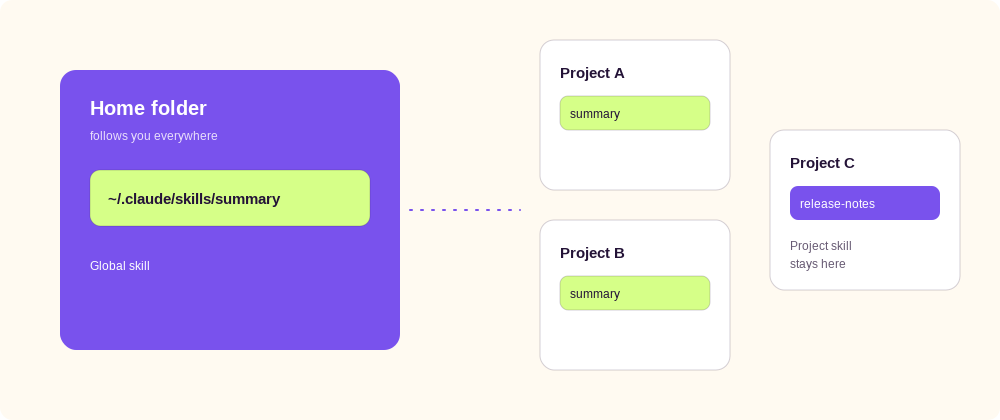
The difference
Learn the two places a skill can live
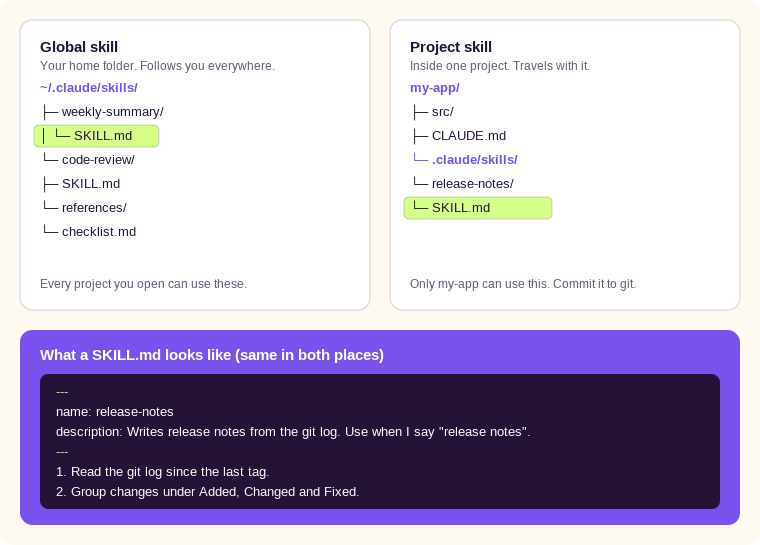
A skill in Claude Code is the same folder with a SKILL.md in it, wherever it sits. What changes is the location, and the location decides who can use it. Put it in your home folder and every project you open can see it. Put it inside a project and only that project can.
- Global (personal):
~/.claude/skills/<skill-name>/SKILL.md - Project:
.claude/skills/<skill-name>/SKILL.md, inside the project folder - The folder name becomes the skill's slash command.
Can't see the .claude folder? (Mac)
Folders that start with a dot are hidden by default. Open Finder, go to your home folder or your project folder, and press Command + Shift + . (period) to show them. Press it again to hide them.
The difference
Untangle skills, Projects and CLAUDE.md
Three things get mixed up here. A Project in the Claude app is a shelf of facts and chats for one business or client. In Claude Code the nearest thing is your CLAUDE.md file, which tells Claude how this codebase works. A skill is different from both: it is a method that Claude loads when a request matches its description. Facts live in the Project or CLAUDE.md. Methods live in a skill.
- Skills travel. A skill is not tied to one workspace, so the same one can work in a chat, in Cowork and in Claude Code.
- Projects and CLAUDE.md stay put. They belong to one workspace and hold what it needs to know.
- Global and project are only the two folders a Claude Code skill can sit in. They say who can use the skill, not what it does.
- A quick test: a skill is what Claude does, and a Project or CLAUDE.md is what Claude knows. If you are describing a process, it is a skill. If you are describing a fact, it is not.
- Keep client or codebase facts out of a global skill. Put them in CLAUDE.md or a Project, and let the skill stay reusable.
- Keep that background clean: short files, clear names, nothing out of date. One messy pile is worse than none.
The difference
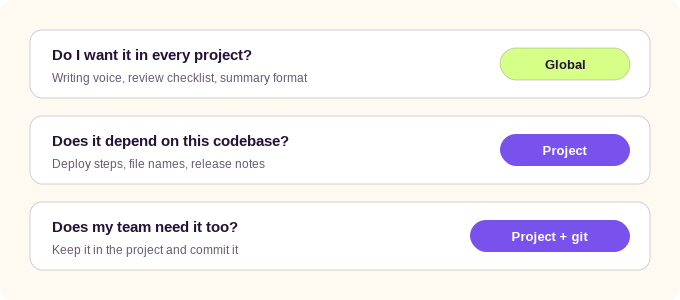
Choose with two questions
You do not need a rule book. Ask who needs it and what it knows about.
- Go global when it is about how you work and you want it everywhere: your writing voice, your commit style, a summary format, a code review checklist.
- Go project when it only makes sense in this codebase or for this team: release notes for this repo, this app's deploy steps, this client's brand rules.
- Not sure? Start in the project. Moving it to global later is just moving a folder.
Create them
Create a global skill
Make the folder in your home directory, then add SKILL.md inside it. The name in the file should match the folder name.
- Paste in the example and change it to a job you really do.
- Save the file.
- You can also ask Claude Code to create the folder and file for you.
mkdir -p ~/.claude/skills/weekly-summary
nano ~/.claude/skills/weekly-summary/SKILL.md---
name: weekly-summary
description: Summarises my week from rough notes into five short bullets. Use when I say "weekly summary" or paste notes from the past few days.
---
Turn the notes into five bullets: wins, problems, decisions, next steps, questions.
Keep each bullet to one line.
Can't see the .claude folder? (Mac)
Folders that start with a dot are hidden by default. Open Finder, go to your home folder or your project folder, and press Command + Shift + . (period) to show them. Press it again to hide them.
~/.claude/skills/weekly-summary/ with a SKILL.md inside it.Create them
Create a project skill
Same file, different folder. Open a terminal in the project, then create the skill inside the project's own .claude folder.
- Keep project details inside this skill: file names, commands, naming rules.
- Save the file.
- Commit it with the rest of the project when you are ready to share it.
mkdir -p .claude/skills/release-notes
nano .claude/skills/release-notes/SKILL.md---
name: release-notes
description: Writes release notes for this repo from the git log. Use when I say "release notes" or "what shipped".
---
1. Run git log since the last tag.
2. Group changes under Added, Changed and Fixed.
3. Write each item in plain English for customers, not developers.
4. Leave out anything labelled chore or internal.
Can't see the .claude folder? (Mac)
Folders that start with a dot are hidden by default. In Finder, open your project folder and press Command + Shift + . (period) to show them. Press it again to hide them.
.claude/skills/release-notes/ folder inside the project, next to your code.Create them
Check that Claude can see both
Start Claude Code from the project folder and ask it what it has. You should see your global skill everywhere, and your project skill only in this project.
- Run
claudein the project folder. - Type
/and look for both skill names in the list, or ask: "What skills do you have available?" - Try one in plain words, such as "write the release notes".
- If a brand-new skills folder is not showing, restart Claude Code once.
name: line match, and that the file is called exactly SKILL.md in capitals. Most "it can't see my skill" problems are one of those.Keep it tidy
Run a skill on top of your CLAUDE.md
This is the combination move. A skill supplies the method and your CLAUDE.md supplies the facts about the codebase, so a short request still gets a result that fits your project. Try it once so you can see the difference.
- Open a project that has a CLAUDE.md with the basics: what the project is, how to run it, and your rules.
- Ask for the job in plain words, or pick the skill from the
/list. - Run the same request in a folder with no CLAUDE.md and compare the two answers.
- Build a second and third skill that lean on the same CLAUDE.md. The gain grows with each one.
Keep it tidy
Know what happens when two skills share a name
It happens by accident, usually when you copy a skill from one place to another. Claude Code has an order of priority when the names collide, and your personal skill beats a project skill of the same name.
- Give project skills specific names, like
acme-release-notes, so they never collide. - The order is enterprise, then personal, then project. Plugin skills carry the plugin name, so they do not clash.
- Keep global names generic, like
weekly-summary. - If a skill behaves strangely, look for a twin with the same name in the other location.
Keep it tidy
Know that every skill costs context, every session
Claude Code puts the name and description of each skill into context when a session starts, and keeps them there. The full instructions load only when the skill is used. One skill is tiny. Dozens of long descriptions are not, and a global skill pays that price in every project you open.
- Run
/contextand look at the Skills row to see what the list costs you now. - The whole list has a size budget. When it overflows, Claude Code trims descriptions, starting with skills you use least, and a trimmed skill triggers worse.
- Each description is also capped, so a very long one is wasted.
- There is no official maximum number of skills. The practical rule is that anything you would not miss should go.
Keep it tidy
Audit and trim with /skill-doctor
Do not guess which skills are dead weight. Run /skill-doctor in the terminal where your session runs. It reports what each skill costs in context and how often it has been used, and flags skills that have never been invoked.
- Start at the top: highest cost and never used.
- Delete what you will not miss, or turn it off from the
/skillsmenu. - For a skill you only ever run by name, add
disable-model-invocation: trueto its frontmatter. It then stops loading its description and only runs when you type its/name. - Shorten any description you keep. Put the main use first and cut the rest.
- Make it a monthly habit. The cheat sheet has a five-minute checklist.
/skill-doctor needs a recent Claude Code version and does not work over Remote Control. Read it as a report and make the changes yourself. Check the Claude Code docs if your version behaves differently.Keep it tidy
Share project skills through git
This is the real advantage of a project skill. It lives in the repo, so everyone who pulls the project gets it, and improvements arrive with the rest of the code.
- Commit
.claude/skills/like any other file. - Review skill changes in a pull request, the same as code.
- Keep personal taste out of project skills. Anything that is just your preference stays global.
Keep it tidy
Avoid the four usual mistakes
These are the ones that cost people an afternoon.
- Putting everything global. Project-specific steps then fire in the wrong repo.
- Putting everything in one project. Your own voice then has to be copied into every repo.
- One giant skill. Split it so each skill has one job and a clear description.
- A vague description. The description is how Claude chooses the skill, so write the phrases you would really say.
Keep the cheat sheet handy
One page with the two folders, the commands, and the fixes for a skill that is not showing. New to skills? Read the first-skill guide too.
 Cheat sheet3 pages: the two folders, what a skill costs, and fixes for a skill not showing.