
Your Claude Code settings.json, explained
settings.json is the rulebook Claude Code checks before it runs a command or reads a file. Learn what goes in it and why it matters, then set it up so Claude can move fast without touching your secrets.
Understand it
What settings.json is
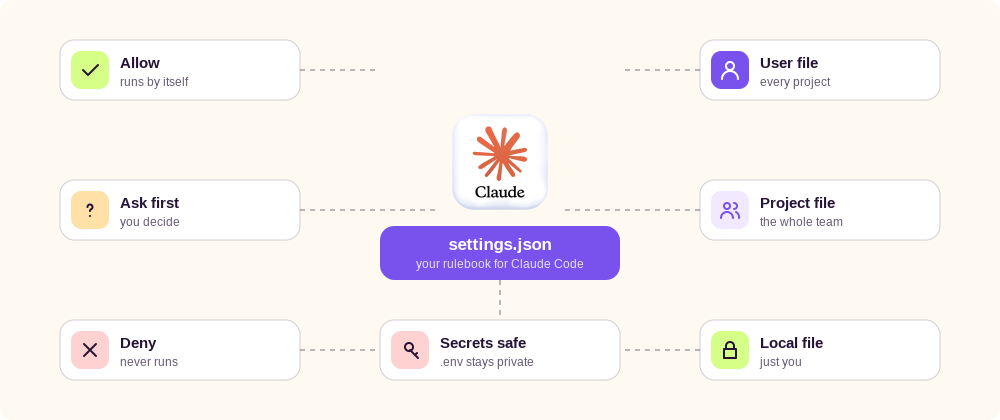
Before Claude Code runs a command, edits a file or reads something, it checks a rulebook. That rulebook is settings.json. Each rule says one of three things: go ahead, ask me first, or never.

allow: Claude does it without asking. Good for safe, boring commands like running your tests.ask: Claude stops and asks you. Good for pushing code or merging.deny: Claude cannot do it, even if you click yes out of habit. Good for secrets and anything destructive.
Without these rules you approve prompts all day, and nothing stops Claude from reading your .env file. With them, the safe things run on their own and the risky things wait for you.
Understand it
Know where the files live
There is not one settings file. There are four places, and each one decides who the rules apply to.

~/.claude/settings.jsonis yours, in every project. Put personal habits here..claude/settings.jsoninside a project is shared with everyone who works there, once it is committed to git..claude/settings.local.jsonis yours, in that one project. Claude Code keeps it out of git.- Managed settings are set by an organization admin. Most people on their own have none.
/status inside Claude Code. The Setting sources line lists every file it loaded.Understand it
Know which file wins
When two files set the same thing, the higher one wins. From the top: managed, then the command line for one session, then project local, then shared project, then your user file.

Lists are the exception. The allow, ask and deny rules from every file are combined, so one file can add rules without removing another file's.
- Put your personal habits in the user file.
- Put team rules in the shared project file.
- Put your own exceptions for one project in the local file.
Write the rules
Create your first file
Make the file by hand, or ask Claude Code to make it. Start small: a $schema line so your editor checks the file as you type, and an empty permissions block you will fill in over the next steps.

{
  "$schema": "https://json.schemastore.org/claude-code-settings.json",
  "permissions": {
    "allow": [],
    "ask": [],
    "deny": []
  }
}
- Save it as
~/.claude/settings.jsonfor rules that follow you into every project. - It must be strict JSON: no
//comments and no trailing commas, or Claude Code reports a Settings Error. - Most edits apply to a running session, so you do not need to restart.
$schema line gives you autocomplete, and a wrong key gets a warning underline.Write the rules
Allow only what you name
allow rules let a command run with no prompt, so keep them narrow. Name the exact command, not a whole tool.

- Good:
Bash(npm run lint)andBash(npm run test *). - Too wide:
Bash(npm *)also allowsnpm publish. - Never:
Bash(*). It hands Claude your whole shell. - Every time you pick “Yes, and don't ask again” on a prompt, Claude Code adds an allow rule to
.claude/settings.local.json. They pile up, which is why step 11 audits them.
npm run test * may not match npm run test:unit, because of the colon. Give scripts with a colon their own rule.Write the rules
Protect your secrets with deny
deny is your safety net. A deny rule beats any allow rule, so it still holds when your allow list grows. Start with the files that hold secrets.

"deny": [
  "Read(./.env)",
  "Read(./.env.local)",
  "Read(./.env.production)",
  "Read(~/.ssh/**)",
  "Read(~/.aws/**)"
]
- List each real
.envfile by name. - Do not deny
.env.example. It holds names only, and Claude needs it to know what a project expects. - A wide pattern like
.env.*would block.env.exampletoo, because deny beats allow.
./ is relative to the folder you start Claude in, so .env files in subfolders need their own rules.Write the rules
Ask before the risky things
Between allow and deny sits ask. Use it for actions you want to see before they happen, so you decide each time.

- Pushing code:
Bash(git push *). - Merging:
Bash(gh pr merge *). - Database changes, and anything that touches money or live data.
"ask": [
  "Bash(git push *)",
  "Bash(gh pr merge *)"
]
Check and keep it safe
Know what deny cannot catch
Rules match the text of a command, so a reworded command can slip past a rule written for the original. A deny rule for git push --force origin main does not match git push origin main --force.

- Deny the dangerous flag, like
Bash(git push --force *), instead of one exact command. - Write a rule for each common spelling of a command you really care about.
- For a hard guarantee, add a
PreToolUsehook: a small script that checks the real command before it runs and can refuse it.
deny.Check and keep it safe
Share the team file, keep yours local
Commit .claude/settings.json so everyone who clones the project gets the same rules. Keep your personal exceptions in .claude/settings.local.json, which Claude Code keeps out of git.

- If you create the local file by hand, add it to
.gitignoreyourself. - A teammate's
allowrules from the shared file wait until they trust the folder.denyandaskrules apply right away. - Some keys, like
defaultModeset toauto, only work from your user file, not from a project file.
Check and keep it safe
Check that it loaded
A typo can quietly drop a rule. Check after every edit.

- Run
/statusinside Claude Code. The Setting sources line lists each file it loaded. - Run
claude doctorin your terminal to see any key or rule it rejected. - If a whole file is broken, Claude Code shows a Settings Error when a session starts and offers to fix it with you.
Check and keep it safe
Audit it with the free prompt
Rules drift. You approve things in a hurry, a teammate adds a key, a connector gets renamed. The free audit prompt reviews your own settings files and tells you what to fix, the way a careful reviewer would.

- Paste it into Claude Code. Claude reads your settings files itself, on your computer. Nothing is uploaded.
- It reports key names only, never secret values.
- It ranks what it finds High, Medium and Low, with the exact fix for each.
- It backs up the file and shows you a diff before any change, and changes nothing without your yes.
Get the free audit prompt and starter file
Paste the prompt into Claude Code and it reviews your own settings files and tells you what to fix. Next, see how to keep keys working everywhere in the environment variables guide.
 Audit promptPaste into Claude Code. It checks your settings files and ranks what to fix.
 Starter settings.jsonSafe defaults: secrets blocked, risky actions ask first.