
Claude skills vs Projects
A skill is a method and a Project is a memory, and you need both. This guide builds one of each from a job you already do, then runs them together so a short request comes back finished and on-brand.
Get the picture
See why they are not rivals
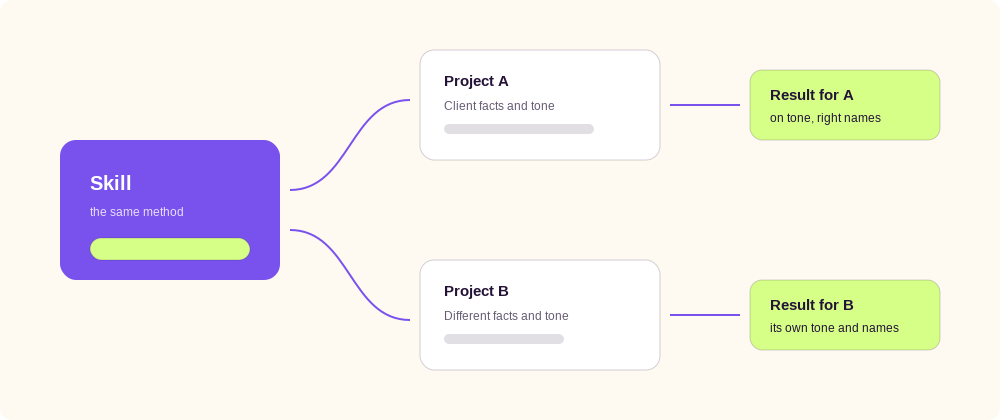
People ask whether to build a skill or a Project, as if one replaces the other. They solve different problems. A Project remembers things about one business, client or topic. A skill carries out a process the same way every time, wherever you run it. Pasting context into every chat is the symptom both of them fix, from different ends.
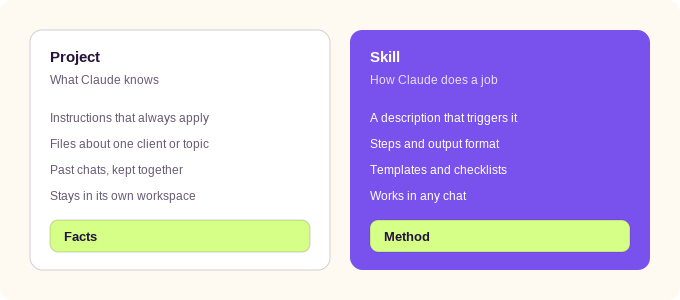
- A Project answers: what does Claude need to know here?
- A skill answers: how should this job be done?
- Skills travel between chats and workspaces. A Project stays in its own space.
- Together: the skill brings the method and the Project brings the facts.
Get the picture
Know what each one is made of
Both have three parts, and the parts rhyme just enough to cause confusion. Sort them once and it stays clear.
- Skill: a description that says when to use it, instructions for how to do it, and optional supporting files such as a template or checklist.
- Project: instructions that always apply, a knowledge area of files Claude can draw on, and the history of chats you have had inside it.
- Supporting files in a skill are short and reusable. Deep background belongs in the Project.
- You can start a skill by typing
/and picking it, or just describe the job and let Claude choose it.
Build both
Pick a job you repeat every week
Start from real work, not theory. The best first skill is a process you already run often and want to come out the same way each time.
- Good picks: a recap of a client call, a post in your voice, a summary of a document, a messy brain dump turned into a plan.
- Write the prompt you would use today, even if it is rough.
- For this guide we use a client call recap as the example. Swap in your own job.
You help me turn rough call notes into a client recap.

Read the notes I paste. Then write:
1. A two-line summary of the call.
2. Decisions made, one per line, stated plainly.
3. Action items with an owner and a due date. If an owner or date was not said, write "unassigned" instead of guessing.
4. Open questions.

Keep it under 200 words. Plain language, no filler, no em dashes.Build both
Turn that prompt into a skill
Let Claude do the packaging. Give it your prompt and ask it to write the skill, then you read it, adjust it and save it.
- Paste the request above into a new chat, with your own prompt at the bottom.
- Read the description it writes. Add the words you would really say.
- In Claude, open Customize, create a new skill, paste in the description and instructions, and upload any supporting files it suggests.
- Save, then type
/in a new chat to check the skill is in the list.
Turn the prompt below into a Claude skill.
Write the description (with the phrases I would really say to trigger it),
the step-by-step instructions, and tell me which supporting files to add,
such as an output template or a checklist.
Give it to me in the format Claude skills expect.

[PASTE YOUR PROMPT HERE]Build both
Build a Project for one client or topic
A Project is a workspace with its own memory. Make one for one slice of your work, such as one client, one product or one department, so Claude stops needing the same background pasted in.
- Create a new Project from the Projects area in the left sidebar and give it a clear name.
- Paste instructions that always apply: who this is for, the tone, your always and never rules.
- Add the files Claude should draw on: an overview, the people, past work, anything it keeps asking you about.
- Leave out one-off files, anything sensitive you have not thought about, and anything that contradicts your instructions.
You are the working assistant for [CLIENT OR BUSINESS NAME].
Who they are: [two sentences].
Tone: [how we write for them].
Always: [two or three rules].
Never: [two or three limits, such as no pricing promises].Build both
Tidy the Project before you rely on it
A cluttered Project does more harm than a small clean one, because Claude draws on all of it. Ten minutes here pays back every time you use it.
- Prefer clean text or Markdown files over scanned PDFs where you can.
- Name files so you can tell what they are:
client-overview,brand-voice,past-proposals. - Delete old versions and anything out of date.
- Keep each file about one thing.
Combine them
Run the skill inside the Project
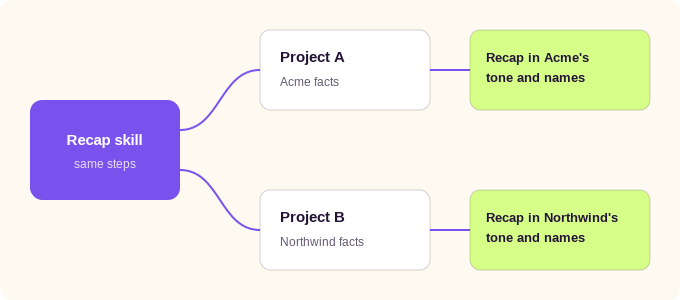
This is the payoff. Open a chat inside your Project and use the skill. The skill brings the steps, and the Project quietly supplies who the client is, how you write for them and what happened before.
- Start a new chat inside the Project.
- Type
/and pick your skill, or just ask for the job in plain words. - Paste your rough notes or give a topic, and nothing else.
- Read the result, then ask for any change in plain language.
Combine them
Compare it with a plain chat
Run the same request once more in a fresh chat with no Project. The difference is the clearest lesson in this guide.
- Use the same notes and the same skill.
- Look at what is missing from the plain-chat result: the names, the tone, the context.
- Do this any time you are not sure whether a job needs a Project.
Combine them
Add more skills around the same Project
Most people build one skill and stop. The gain really starts when several skills draw on the same Project, because you only build the background once.
- Pick your next repeat job and turn it into a skill, the same way.
- Run each inside the same Project.
- Use a skill alone for jobs that need no background. Use a Project alone for open-ended thinking and planning. Use both when you need finished work.
- Revisit the skill descriptions now and then, so plain wording keeps triggering them.
Use the worksheet
One page to decide skill or Project for any job, set up a Project cleanly, and a ready prompt for building your skill.
 Worksheet2 printable pages: three questions, a skill prompt and a Project checklist.